


Navy Federal Credit Union
3.743.19K Reviews
App Specs
- Version
- 2026.8.1
- Updated On
- License
- Free
- Downloads
- 10,000,000+
- Developer
- Navy Federal
- Categories
- Finance
- Platform
- Android
Screenshots

 Analysis by AppCompare
When I first opened Navy Federal’s banking app, I wanted to know whether it could make routine money tasks easier without turning every visit into a project. It is a free finance app from Navy Federal, and it is aimed at members who want to handle everyday banking from a phone. My impression is that it can be useful as a practical companion to an existing membership, especially when checking balances, moving money, or dealing with a bill away from home.
It is worth setting expectations before you install it: this is a mobile doorway to Navy Federal services, not a general-purpose budgeting app or a replacement for every financial tool. If you are already a member, the app can bring several common account tasks together. If you are not, the first question is whether Navy Federal is the right financial institution for you; downloading the app alone does not settle that. The app has a 3.7 average from around 109,000 ratings, so I would treat it as useful but not assume every person will find the experience equally smooth.
Getting Started with Navy Federal Credit Union
I’d make the first session about orientation, not transactions: check that you can sign in and recognize the accounts shown before changing or sending anything. That gives you a calm baseline and makes it easier to spot an unfamiliar detail later. Once the account view feels clear, you can choose a small, familiar task as your first test.
What to expect before signing in
First things first, downloading the app is a breeze. Available on both Android and iOS, you can find it on your respective app store. Once downloaded, the setup is straightforward. Just have your member number ready, and you're good to go. The app ensures a smooth onboarding process, guiding you through each step with ease.
On Android, the current version is 2026.5.1 and the minimum operating system is Android 11. The app is free, has an Everyone content rating, and has been available since July 29, 2011. It has passed 10 million installs, which suggests many people use it, but popularity by itself does not guarantee that its navigation will suit you. I would check that your phone meets the system requirement and that you can access your membership details before beginning setup.
As a first-time user, I would also make a small distinction between having the app installed and being ready to bank. Keep your member information handy, choose a login method you are comfortable using, and allow yourself a few uninterrupted minutes to get oriented. If you are setting it up while traveling or in the middle of another task, even a simple sign-in can feel more frustrating than it needs to. The best first session is a calm one: sign in, confirm that you can see the account area you expect, then try one low-stakes task before relying on the app for something urgent.
Finding your way around
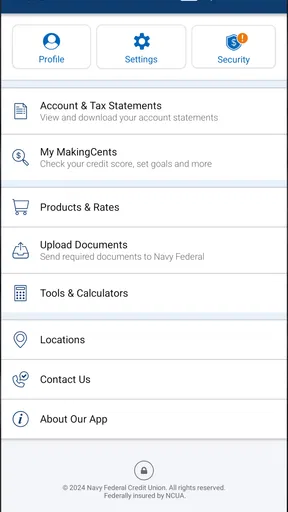
Now, let’s talk about the design. The interface is clean and intuitive, which makes navigation a walk in the park. You don’t need to be a tech whiz to figure it out, and that’s something I really appreciate. Everything is logically laid out, from your accounts overview to bill payments.
Worth Reading Before You Choose

Flipboard Shows What News Apps Must Do Beyond the Feed

Switching to Android Auto Means Rethinking Your Driving Routine

Google Calendar Makes a Crowded Week Easier to Manage

Ludo King Makes the Most of the Minutes Between Plans

Baby Panda World Brings Quick Play to Modern Phones, but Its Game Library Feels Busy

ESPN’s Live Game View Makes Following Close Games Easier
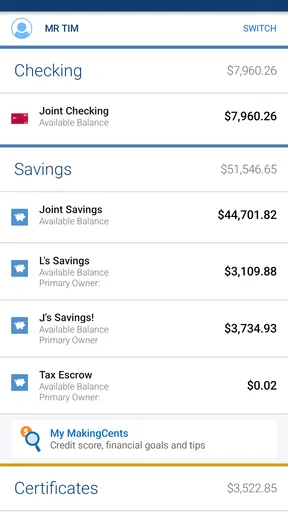
The practical value of an account overview is not just seeing a balance; it gives you a quick place to begin before deciding what action to take. For example, I would check the relevant account first, then go to transfers or bill pay rather than trying to remember which section might contain a task. That simple habit helps reduce mistakes when you are handling money quickly. If you use more than one account, take a moment to identify which one is being used for a payment or transfer before confirming it.
For a first meaningful success, start with something easy to verify, such as checking an account balance or reviewing a bill you already recognize. Once you know where those details appear, you can move on to a small transfer or a one-time payment. I would not make a large or time-sensitive transaction my first experiment. A low-pressure task lets you learn the app’s flow and confirmation screens before the stakes are higher.
Features That Stand Out
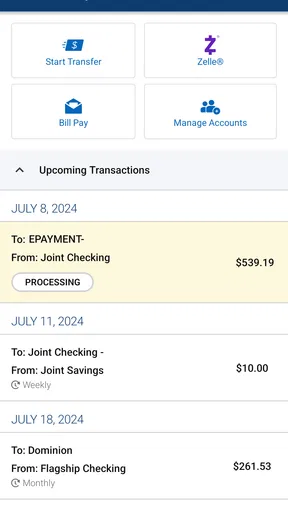
One of the standout features of the Navy Federal Credit Union app is the ability to manage multiple accounts effortlessly. Whether it's checking, savings, or even loans, everything is right there at your disposal. Need to transfer money? No problem. The app lets you transfer funds between accounts or to other members with just a few taps. It’s fast, efficient, and, most importantly, secure.
That range is most helpful if you already keep several parts of your finances with Navy Federal. Instead of opening separate tools to check a deposit account and a loan, you can use one place to get a broader view. A useful everyday example is checking your available balance before moving money into savings, then confirming the transfer afterward. For a transfer to another member, double-check the recipient and amount before submitting; convenience is valuable, but it does not remove the need to verify where money is going.
One trade-off is that the app’s usefulness depends on how much of your financial life is already connected to Navy Federal. Someone who primarily banks elsewhere may still need their other institution’s app for balances and transactions, leaving them to switch between services. In that case, a broad budgeting tool may be better for seeing spending across several banks, while this app is the more direct choice for managing Navy Federal accounts themselves.
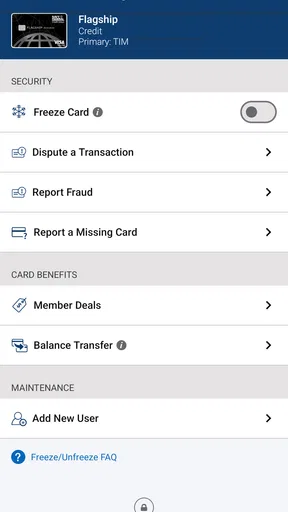
Speaking of security, I was impressed with the app's security features. From biometric login options to multi-factor authentication, your data is in safe hands. It’s reassuring to know that even if you lose your phone, your financial information remains protected.
Biometric sign-in can make repeated checks less of a chore, while an additional authentication step can add friction when you are logging in from a new situation. I see that as a reasonable trade-off for a finance app: a few extra moments at sign-in are preferable to treating account access casually. Still, phone security matters too. Use a screen lock, avoid sharing your login details, and contact the institution through a trusted channel if you suspect someone else has accessed your account. An app’s security options are useful, but they are not a substitute for careful habits.
Paying Bills Made Easy
Paying bills can sometimes feel like a chore, but not with this app. The bill pay feature is incredibly simple to use. You can set up automatic payments or make one-time payments without breaking a sweat. Plus, the app sends you notifications, so you’re always on top of your financial game.
Automatic payments are convenient for recurring bills, but I would not set one and forget it completely. Check the payment details when you arrange it, and periodically review your account activity so you can spot an unexpected amount or a change in a bill. For a bill that varies, a one-time payment may give you more control. Notifications can help you remember to look, but I would treat them as prompts rather than proof that every payment has gone through as intended.
A realistic use case is handling a bill during a lunch break: open the app, confirm the account you intend to pay from, review the bill, and choose either the one-time option or an automatic arrangement that fits the bill. If the deadline is close, do not assume that tapping a button means the payment will arrive immediately. Read the app’s confirmation and timing information before relying on it for a last-minute payment.
Credit checks and finding a location
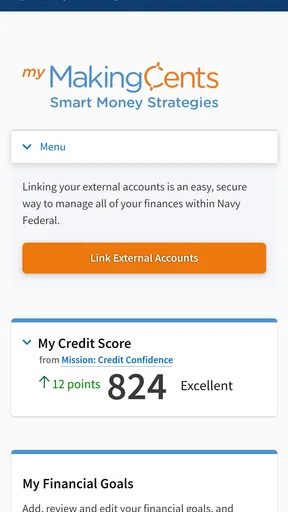
Now, let’s talk about some of the extra perks the app offers. For instance, you can keep track of your credit score directly from the app. It’s a nifty little feature that provides insights into your financial health without the need for third-party services.
I would use that view as a convenient check-in, not as a complete credit-planning system. A score can give you a quick point of reference, but it does not explain every factor behind your financial picture. If you are preparing for a major borrowing decision, you may want more detailed information than a glance at a score. For routine monitoring, though, having it alongside account activity can make it easier to remember to check in without opening another service.
Another cool aspect is the ability to locate ATMs and branches nearby. Whether you're traveling or just out and about, finding the nearest Navy Federal Credit Union location is a cinch. The app uses your GPS to give you directions and details about each location.
This can be especially handy when you need an in-person option or are away from the places you know. Before making a special trip, I would check the location details shown in the app and consider whether an ATM or a branch is what you actually need. A locator is useful for finding nearby options, but it does not make the app a substitute for speaking with a person when a situation needs individual help.
Who will get the most from it
I think the strongest fit is a Navy Federal member who wants to handle routine account checks, transfers, and bills from a phone. It is also a sensible choice for someone who values having deposit accounts and loans visible in one place, or who travels and appreciates being able to search for a nearby location. The app is less compelling for someone who wants a single dashboard for accounts held at many financial institutions, or whose main need is detailed spending categories and household budgeting. In those cases, a multi-bank finance app may complement it better, while the institution’s own app remains the place for direct account actions.
If you are unsure whether to make it your everyday banking tool, try a gradual approach: sign in, review your accounts, then complete one familiar transaction and check the resulting activity. That gives you a useful sense of whether the layout and confirmations work for you before you depend on it for recurring bills. If you have difficulty signing in or cannot find a particular task, use the app’s available support routes rather than repeating a transaction in the hope that it worked. For money matters, confirming the result is always worth the extra moment.
Final Thoughts
All in all, the Navy Federal Credit Union app is a solid choice for anyone looking to simplify their banking. It combines functionality with security, all wrapped up in an easy-to-use package. Whether you’re handling daily transactions or managing long-term savings, this app has got you covered. So, if you're part of the Navy Federal family, give it a try and see how it transforms your banking experience. Trust me, you won’t regret it!
My more measured recommendation is to think of it as a convenient mobile branch for members, rather than a universal money-management solution. Its everyday strengths are easiest to appreciate when your accounts and regular tasks are already with Navy Federal. The main friction is that people who bank widely across other institutions may still need additional apps, and anyone making an important payment should take time to verify the account, recipient, and confirmation. If that balance suits the way you bank, it is a useful app to have ready when a small financial task cannot wait until you are at a computer.
Pros
- User-friendly interface for easy navigation.
- Real-time alerts for account activity.
- Secure login with biometric options.
- Comprehensive financial management tools.
- Excellent customer support availability.
Cons
- Limited international banking options.
- Occasional app crashes reported.
- Some features require internet access.
- Transaction history search needs improvement.
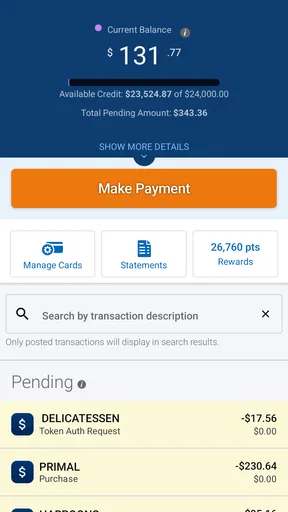
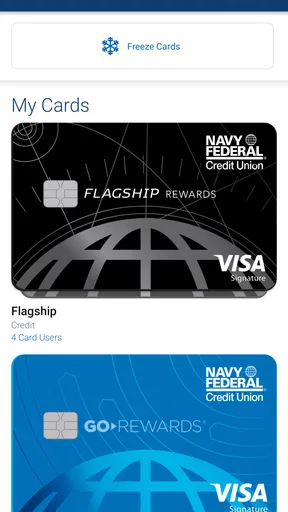
- Credit card management options are basic.
FAQs for Navy Federal Credit Union
What features does the Navy Federal Credit Union app offer?
The Navy Federal Credit Union app provides a wide range of features including mobile check deposit, account management, bill pay, and fund transfers. Users can also access credit card information, view transaction history, and set up account alerts. Additionally, the app offers a secure messaging feature for direct communication with customer service.
Is the Navy Federal Credit Union app secure?
Yes, the app is designed with robust security measures to protect user information. It includes multi-factor authentication, fingerprint and facial recognition login options, and encryption to safeguard data. Users can also set up security alerts to monitor account activity and receive notifications of any suspicious transactions.
Can I access my accounts from multiple devices?
Absolutely, the Navy Federal Credit Union app supports access from multiple devices. Whether you're using a smartphone or tablet, you can log in and manage your accounts seamlessly. Just ensure each device is registered and follows the app’s security guidelines to maintain account safety.
What should I do if I encounter issues with the app?
If you experience any problems with the app, it is recommended to first check for updates, as updates often resolve common issues. If the problem persists, you can contact Navy Federal’s customer service through the app’s secure messaging feature, or call their support line for further assistance.
Is there a fee to use the Navy Federal Credit Union app?
No, the Navy Federal Credit Union app is free for all members. There are no charges for downloading or using the app’s features. However, users should be aware that data charges may apply depending on their mobile carrier’s plan, especially when accessing the app over a cellular network.


